Category Archives: ICT Blog

ICT Blog

Packets Rule – an affirmation during an East Coast Road Trip

Tom Nakamura, a colleague and I just finished an East Coast road trip to visit prospects, customers, and partners.  Thanks to those we met and their hospitality, allowing us to present and discuss SYNESIS to them and their respective teams.

One of our stops was to meet and strategize with our tech partners and friends at Garland Technologies at their HQ in Buffalo, New York.  BTW: I just love their tagline: “See every bit, byte, and packet.” Big thanks to Chris Bihary, Garland Technology CEO, for his thoughts, vision, guidance, and hospitality.  Both Tom and I now know more about Garland and are looking forward to future joint marketing and solution engagements.

We also made other stops in the New Jersey and Manhattan, NY area.  One important affirmation during our road trip:  While packet capture may be considered outdated to some, the engineers in charge of actually solving the toughest network and security problems live and die by their packet data.  Whether for security, performance, or application issues, complete and reliable packet captures and resulting tracefiles are the primary and most reliable data source for troubleshooting.  Furthermore, that data can be further visualized and reanalyzed using complementary tools, whether available now or still to be engineered.  It’s like newfound DNA from a suspect of a decades old crime.  Once you have it, a suspect can be justly blamed or exonerated.  The same applies in networking.  When someone tells you that your “network is slow” nothing beats complete packet data to help you fix the problem or to prove the conclusion was premature.

Angelo Bustos
Solutions Consultant Director
angelo.bustos@toyotechus.com

Yoko Nonaka’s Interop Tokyo 2018 Recap

What a privilege it was for our SYNESIS to be part of ShowNet.  ShowNet was the network for Interop Tokyo 2018.  Facebook: https://ja-jp.facebook.com/interop.shownet/  The network involved 60 vendors, 400 engineers, and 80M USD of equipment.  Carefully planned for months in advance, actual physical deployment started two weeks before the start of Interop Tokyo.  All equipment was connected and thoroughly tested.  You can just imagine the flurry of events that occurred during that period.  The ShowNet network went live during Interop, not just for show, but  also to protect the event and all participants from cyberattacks.  TOYO Corp’s contribution in ShowNet was our very own SYNESIS Distributed 100G.

SYNESIS was appropriately nicknamed by the Network Operations Center as the “Messiah”, always connected to their 100GbE packet aggregation point, collecting every single byte that appeared in the ShowNet network.  If it happened in ShowNet, then SYNESIS kept a record of it, no packet left behind.  SYNESIS 100G, was installed in the monitoring area dedicated for forensics in case of incidents.  SYNESIS performed perfectly during the entire event.  You can imagine the bandwidth heavy applications in these events.  Even during peak traffic rates, not a single packet was loss by SYNESIS.

Looking back, ShowNet and Interop Tokyo 2018 was a very memorable highlight in my career.  It was so exciting to work with over 400 engineers from different companies.  We were colleagues for just a few days but the friendships and fond memories will remain with me for a long time.   I cannot wait until next year.

Yoko Nonaka

SYNESIS Marketing, TOYO Corp. Japan

nonakay@toyo.co.jp

SYNESIS and Garland Technology @Cisco Live! 2018

I just attended “Cisco Live! 2018,” held from June 10-14 in Orlando,Florida – it was a very impressive event!  TOYO Corporation Japan has carried Garland Technology products with great success in Japan so I was fortunate enough to have been invited to join them this year at the event as a valued partner.  Every day the Garland Technology booth was filled with many excited visitors from all over the world looking for solutions to help them manage and improve their networks.  Well, they came to the right booth.  Garland Technology, backed by the world’s most advanced technologies, provides complete network visibility with 100% network uptime.

For myself, I had excellent opportunities of introducing our sophisticated “SYNESIS-Garland Joint Solution”.  My conversations with the many skilled engineers from all over the world confirmed that we do indeed have a first-class solution.

Download the SYNESIS-Garland Joint Solution!

Kensaku Hashimoto
SYNESIS Product Manager

hashimotok@toyo.co.jp

Contact us for more information!

Reducing the Noise during Packet Capture

Having packet visibility by way of a network recorder to troubleshoot intermittent network problems is a good problem to have.  Complement that with a good network monitoring tool (i.e. netflow collector and visualizer) and you’ll typically have all you need at the most granular level when investigating network issues.  However, trying to manage the data deluge for any network related investigation is like trying to find a needle in a haystack.  To minimize your investigation time you’ll need to “reduce the noise”.  Don’t save what you don’t need.

If your network recorder has built-in hardware filtering then you’re in luck.  You can selectively store only what is of interest.  Since filtering is done at the hardware level, a performance hit on the network recorder won’t be an issue.  Common network recording filter configurations are:

  • VLAN ID
  • IP Address
  • QoS Value
  • Layer 2 or 3 application
  • …or some value at a fixed offset

A more comprehensive solution involves a network packet broker that can provide packet visibility from different parts of your network, centralize it, then forward it to tools that may benefit.  For example, Garland Technologies has a great solution.  With Garland’s EdgeLens, you’ll have complete packet visibility for any Ethernet interface (1G/10G/40G/100G).  Since EdgeLens supports 100Gb/s interfaces, no network is too large.  Pair it with a matching 100Gb/s network recorder like TOYO Corp’s SYNESIS and you’ll always have the packets needed for your network investigations.

Download our joint solution.


Angelo Bustos

Solutions Consultant Director

angelo.bustos@toyotechus.com

Why Netflow is not enough

Most large organizations enable netflow in their network routers and switches as part of their application or network performance suite of tools.  It provides a high-level view of an interface’s overall throughput, very helpful for determining on congestion conditions and who’s using the link (bandwidth hog).

Netflow was originally introduced by Cisco for their routers where it collected IP network flow statistics at an interface.  That data can then be forwarded to a netflow collector for consolidation and analysis.  Since then, various network infrastructure vendors have come up with their own versions (i.e. Jflow from Juniper Networks) to help monitor their own equipment.  However, they all serve the same purpose which is to provide network engineers a high-level view of their network: throughput, applications, class of service, users (IP addresses).

While netflow help identify congestion and network bandwidth hogs, it does have limitations when it comes to troubleshooting network issues:

  • Data is summarized in 1 to 5 minute windows so granularity is lost
  • Most internet based apps are lumped under port 80 so any application running over HTTP can’t be identified or summarized
  • When network load is too high, sampling is used which translates to missed data.

So during network analysis, Netflow will point you to where to look but not the details.  A netflow deployment should be complemented with a full network recorder (packet capture) solution.  So, when detailed network analysis is required, packets are readily available   Packet visibility is important because:

  • Packets provide the most granular level of network data for fault analysis
  • Packets, when collected without loss, allows detailed analysis bit by bit, byte by byte) from header to payload.
  • Records of packets can be analyzed and re-analyzed.
  • Packets records can be used for validating fixes on network appliances (Security, APM/NPM,…etc).
  • NEMs,network engineers,application engineers will typically require packet records to analyze and fix network equipment or application issues.
  • Packet can be used for compliance (i.e. HIPPA).

Packet is King when full network analysis is required, something that non-packet based solutions like netflow can’t provide.

For more information

Angelo Bustos

Solutions Consultant Director

angelo.bustos@toyotechus.com


100G and Network Packet Brokers – eliminating the packet visibility dilemma

Network Packet brokers like Gigamon and Ixia provide network visibility.  They classify, filter, and share the aggregated load into sizeable chunks for network and security tools to handle.   If you have a network packet broker solution, then congratulations!  It means you manage a sizeable network that’s worthy of such a solution.  However, it still gets complicated as your network traffic grows beyond your network tools’ limits.  For example, you may have a 10G network recorder (packet capture) appliance.  However, with the increased traffic growth, that appliance will start struggling and lost packets will be the norm rather than the exception.  The recommended solution from your vendor is to buy more of his network recorders and balance the load amongst them with your network packet broker.  Good for your vendor but not so much for your wallet.  In addition, splitting streams between multiple network recorders has inherent issues.  You lose the big picture since you’re forced to work with isolated traffic.  Timing will also be lost when you recombine the packet streams into one because of “time drift”.  The real solution is a network recorder that keeps up with growing Ethernet rates.  One big picture and no complications.  Make sure it can handle beyond 10Gbps rates and in some cases, up to 100Gbps.  Do you agree or disagree?  Let us know.  Contact Us.


For more information: https://toyotechus.com/network-and-virtualization-solutions/packet-recorder/

Angelo Bustos

Solutions Consultant Director

angelo.bustos@toyotechus.com

Don’t wait until your network is overloaded!

Network Recording as an insurance policy

If you have a growing customer base, your network will grow.  Not if but when.  You can equate it to a fast moving train but just around the bend could be trouble, most minor but some can be catastrophic to your business: too many users, inefficient applications, faulty hardware, security attacks, etc.

source: http://www.abc.net.au/news/2011-05-10/an-overloaded-forklift-lies-in-a-container-yard-in/2695616

Are your network tools ready?  If not, consider a network recorder.

Network Recorders have typically been synonymous with network monitoring tools.  Packets from these recorders produce real-time statistics and analysis.   But what happens when these tools cannot keep up when Ethernet rates climb past 10Gb/s and up to 100Gb/s?  When you can’t analyze network issues, related costs can quickly cascade to loss of business.  What if network data can be recorded, not just for real-time statistics and analysis, but for insuring missed network events from the past few minutes, hours, or days can still be addressed?  That’s what  dedicated network recording solutions provide.  They complement your current network toolkit and as long as your tools understand Wireshark PCAP formatted files, which most do, then any missed event can still be analyzed.  Don’t wait for your network to blow up your monitoring tools.

https://toyotechus.com/network-and-virtualization-solutions/packet-recorder/

Angelo Bustos

Solutions Consultant Director

angelo.bustos@toyotechus.com

Don’t settle for less when it comes to packets. As they say, “Packets don’t lie!”

Network Engineers are faced challenged with ever increasing Ethernet traffic rates, even up to 100Gb/s and beyond.  It’s unavoidable as the user base grows, IoT proliferates, and media rich applications demand higher network bandwidth.  Network engineers that depend on packet capture for troubleshooting data face a huge dilemma…packet loss with current legacy capture solutions.  Yet most network monitoring vendors aren’t providing adequate solution updates.  Instead, their responses to your need are typically: “What for” and “Why”?  Those same vendors will give you plenty of excuses of not needing packets anymore while steering you to try their new non-packet or packet sampling solutions.  Why?

The real reason for the lack of support is they simply CAN”T DO IT!  We say, “It is indeed possible to capture at 100G without losing packets.”   At TOYO, we didn’t settle for less when it comes to packet capture.  In the next few days I’ll explain how we use specialized hardware and patent pending software in providing you complete packet data for analysis.

SYNESIS is the only packet capture solution in the market capable of capturing up to 100Gb/s, continuously and without packet loss.

Click here for more information on SYNESIS.


Angelo Bustos
Solutions Consultant Director
angelo.bustos@toyotechus.com

The Three Rs for Network Device Testing & Troubleshooting: Record, Replay, Replicate (Part 3 of 4)

Part three of a four part Use Case series

Use Case 3: Testing security appliances with real world data with SYNESIS

Not a day goes by where you don’t see another security breach, zero-day exploit, or some malicious software wreaks havoc to users and organizations.  Just recently the WannaCry cyberattack just hit computer systems worldwide.  Some vulnerabilities don’t even make it to the headlines and aren’t discovered for weeks or even months?  So what does that tell us?  Current security tools don’t know what they don’t know!  That’s a big dilemma for security vendors and their customers.  How can security vendors, their appliance products, and teams:

  • Analyze security exploits that have already occurred if their products failed to catch them in the first place?
  • Insure future product releases are regression tested using real world data?

With today’s high traffic rates, security appliances often can’t perform real time analysis fast enough.  Typical IPS analysis performance is typically less than 10Gbps even when running at the lowest resource intensive security functions.  When organizations are faced with multiples of 10Gbps aggregated traffic even the highest rated security appliances can’t analyze fast enough in real time.   The result, missed data…missed analysis.  An organization can load balance traffic between multiple security appliances of the same type but that can prove costly and it still doesn’t guarantee all traffic is analyzed at all times such as during microburst conditions.  This adds extra pressure on security vendors….how can they analyze missed data and insure future releases are tested against real world data.

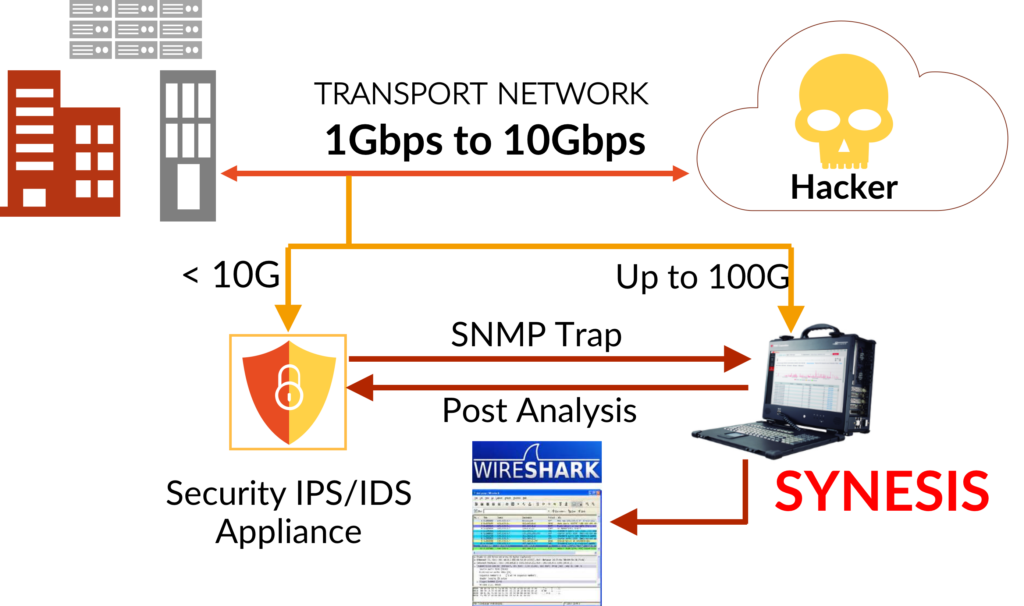
With SYNESIS, real world data can be captured even at the highest ethernet rates.  SYNESIS Capture and Replay allows network security appliances to re-analyze missed data or retest after a patch is available.  This guarantees complete packet data is always available for post analysis.  With SYNESIS’ Three Rs we can:

RECORD – External traffic is duplicated into SYNESIS for long term storage during normal business hours.  During high traffic conditions a security appliance may not analyze fast enough given the sheer volume of traffic or, in the worst case, due to a catastrophic failure.  However, all packet data is mirrored with the use of taps/network packet brokers to a SYNESIS Portable or Rackmount appliance for Recording.  SNMP Traps may also be sent by the security appliance to lock the packet data in SYNESIS for a specific time range to prevent it from being over written.  That data will then be available to the security appliance for post analysis in addition to manual analysis using a packet decoder (i.e. Wireshark).
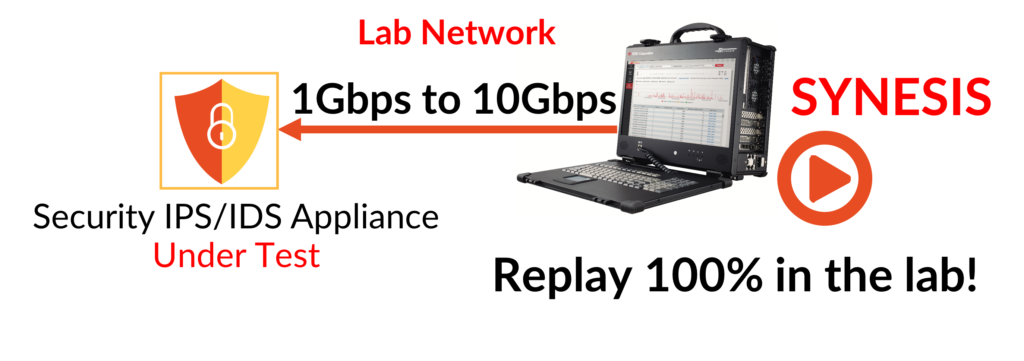
REPLAY to REPLICATE – Security vendors may also take the recorded traffic containing the suspect data back into their lab for further packet analysis in pursuit of a code fix by security engineers.  The data may be Replayed to Replicate the conditions that caused the failures in a more controlled environment with the security appliance as the device under test.  The data may also be replayed during automated regression tests by QA teams.
Click here for more information on SYNESIS!

Click here for Part 1: “The Three Rs: Record, Replay, Replicate — Replicating customer issues in the lab”

Click here for Part 2: “The Three Rs: Record, Replay, Replicate — Isolating a video streaming quality issue using SYNESIS”

Be on the lookout for Part 4 of our four part series: “The Three Rs: Record,Replay,Replicate”

The Three Rs for Network Device Testing & Troubleshooting: Record, Replay, Replicate (Part 2 of 4)

Part two of a four part Use Case series

Use Case 2: Isolating and replicating video streaming quality issues using SYNESIS

When a video stream is pixelating the blaming game always starts with the network as the primary suspect.  For a network engineer or vendor to prove otherwise, capturing,troubleshooting, and replicating these type of issues are always a challenge with these questions part of the troubleshooting workflow:

  • What part of the network is causing the packet loss problem:  the service provider’s cloud or on premise at the customer site?
  • When does it happen?  Is it intermittent?  Any patterns in occurence?
  • Where and how can I obtain visibility?

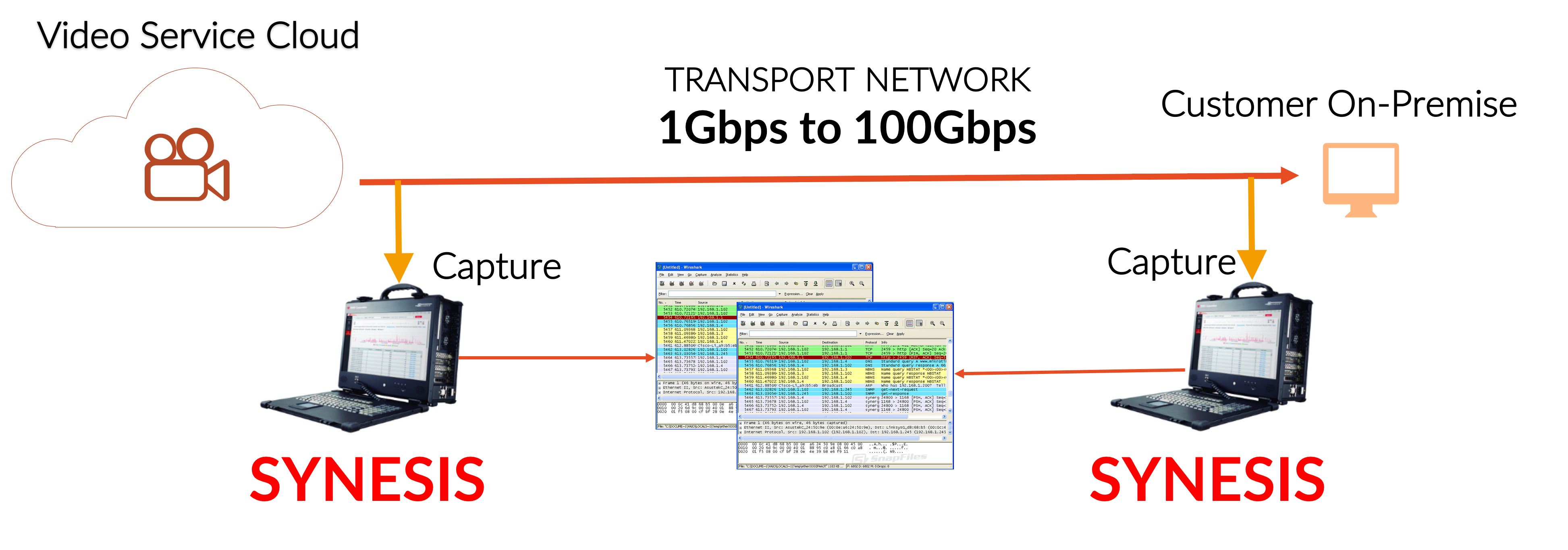
Getting answers to these questions is not trivial since unless you have a easily deployable portable network recorder capable of high fidelity capture rates with no packet loss then solving these types of problems is very difficult.  Fortunately, this is where SYNESIS and the Three Rs can help.

RECORD – Use a “divide and conquer” approach in isolating where in the network the packet loss is occurring.  Start capturing at two different locations: closest to the video source, closest to the destination (i.e. end user).  Compare the capture results between the source and destination.  If the packet count for the video flow is less at the end user then there was definitely packet loss somewhere in the network path between the source and destination.  The next step is pin-pointing the packet loss location by systematically moving the second SYNESIS’ capture point closer to the video source.  Also, in addition to having real world traffic for testing where the chance of problem replication is increased, you now have the data for a repeatable test.

UseCase2_a

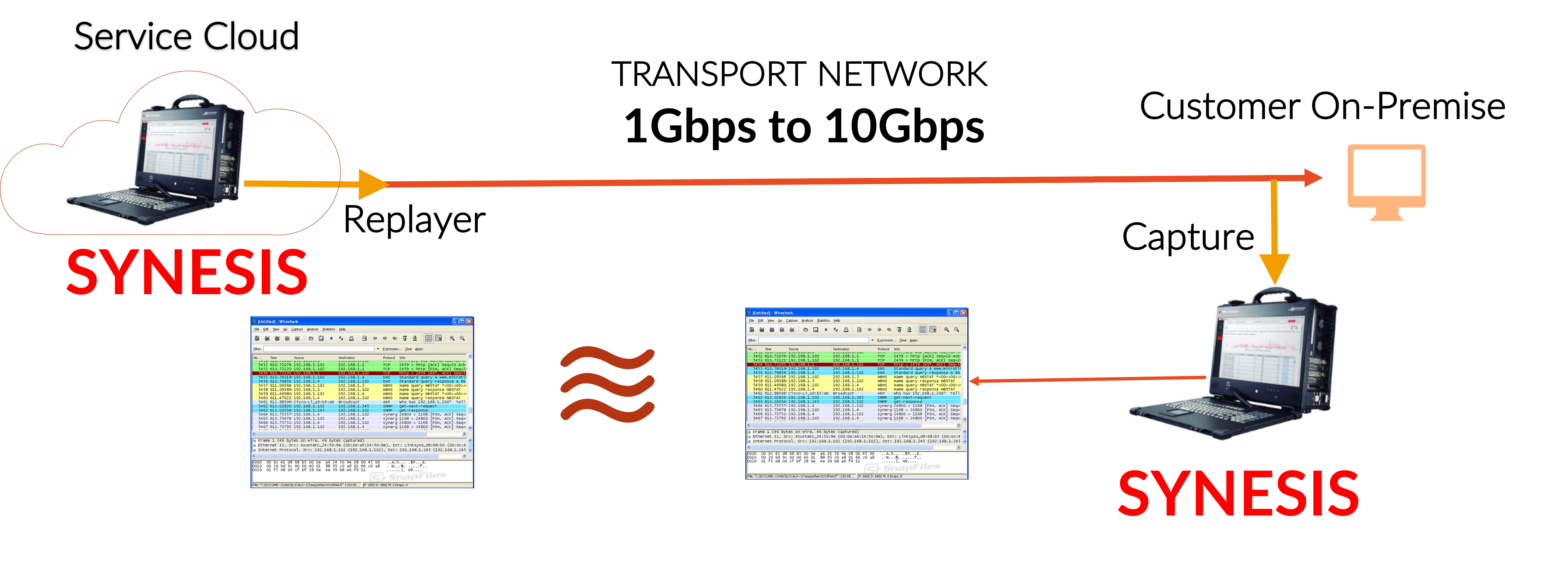
REPLAY to REPLICATE – Use SYNESIS Replayer to generate the traffic conditions that triggers the packet loss.  Again, compare the capture flow to what was replayed.  If there was packet loss then the faulty network hop is still upstream.  Systematically move your capture point closer to the video source then replay and compare results again.  Eventually, you’ll be able to identify the problematic hop or section in your network causing the packet loss.  The fix may involve setting QoS, physical hardware changes, reconfiguring load balancers,…etc.  After the the location has been identified and network configuration changes have been applied, rerun the test to confirm the fix.

UseCase2_b

Click here for more information on SYNESIS!

Click here for Part 1: “The Three Rs: Record, Replay, Replicate — Replicating customer issues in the lab”

Click here for Part 3: “The Three Rs: Record, Replay, Replicate — Testing security appliances with real world data with  SYNESIS”